Create surveys & leverage results faster than ever
Blueprints make survey-building quick & easy
Survey Blueprints make it easy to drag and drop survey questions designed by the experts. Since the start of 2025, Highlight has added over 90 Survey Blueprints across 8 product categories.
Build niche tester audiences with more filters
New profile questions for Highlight's product testers now include topics like social media habits, diet, personal care considerations, and more for a total of 46 filtering options.
Copy and paste past projects to move faster
Keep your research rolling by re-using past surveys and audiences to action your next project quickly.
NEW IN THE PLATFORM
Build products on a foundation of deep understanding of your audiences
The best products start with clarity on who you’re building for and what motivates them. That’s why we created Highlight Audience Profiling: a sharper way to define target consumers, reveal what makes them tick, and guide smarter marketing, innovation, and product strategies.
NEW IN THE PLATFORM
Make confident decisions based on connected historical data
Highlight’s new multi-project dashboards make it easy to compare results across research projects. Identify winning patterns, see metrics moving in the right direction over time, and make stronger, data-driven decisions.
Analyze and action your results faster than ever
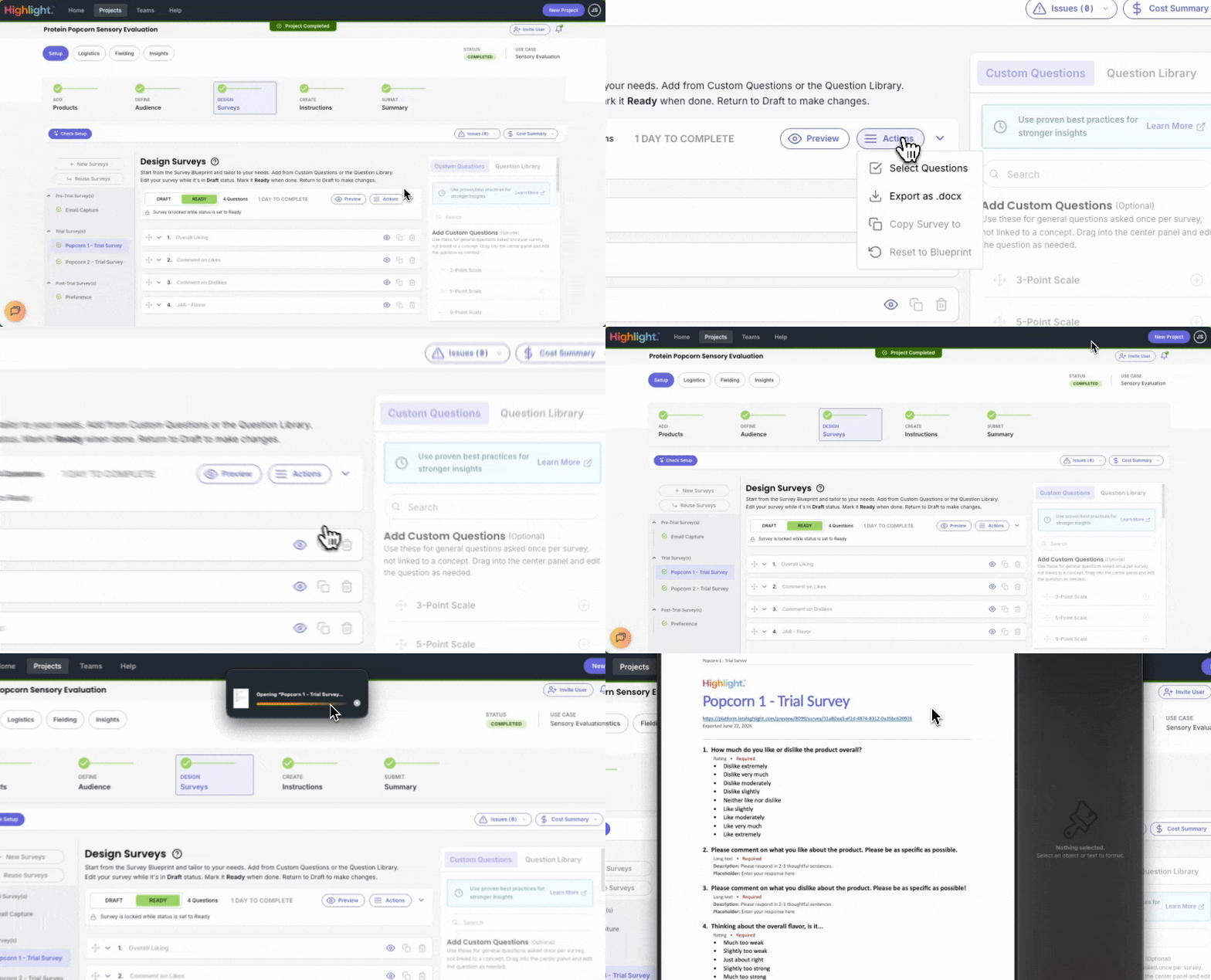
Preview your survey before hitting “Submit”
Toggle between mobile and desktop previews, or scan a QR code to view the survey directly on your mobile device—so you know exactly what participants will experience. You can also share a preview link with collaborators.
Manage project notifications
Control what team members get notified, and for what. The new bell icon at the top right of your Highlight platform brings you to customizable notification settings for every project and each member of your team. (And if someone’s missing, you can now invite them to join your account!)
Add new users to your team
Invite your colleagues to your Highlight account by hopping over to the Teams page and inviting them to join your project.
Ranking questions are now in Crosstabs
Use your updated Crosstabs view to see which option respondents ranked as their top choice, listed as a percentage. Dig deeper by comparing results between segments such as age, gender, or geography.
Move even faster with confidence in AI-powered quality checks
Highlight now assures data quality in real-time, providing valid results faster than you can click “refresh.”
Add video responses to your research
Bring the consumer voice to life with video submissions from your research participants. Video surveys are integrated into the survey design step for greater control and customization.
Smart suggestions for survey edits
Highlight’s Survey Blueprints now provide smart suggestions for the best way to edit your questions and other aspects of your survey to ensure you’re using best practices in every detail.
Automated survey checks to keep you in check
Nothing ruins a research team’s day more than launching with errors that compromise your data. That's why Highlight's platform prevents duplicate answer choices within the same question and warns you when there are repeated questions in the same survey.
Save time with bulk edit functionality
Spend less time prepping your survey and more time enjoying the results. Upload the same image stimulus to all questions, update a field in all questions with one click, or use checkboxes or Select All to make bulk edits to your survey. And if you ever regret a click, you can always reset your survey to the original Blueprint.
Blueprints make survey-building quick & easy
Survey Blueprints make it easy to drag and drop survey questions designed by the experts. Since the start of 2025, Highlight has added over 90 Survey Blueprints across 8 product categories.
Build niche tester audiences with more filters
New profile questions for Highlight's product testers now include topics like social media habits, diet, personal care considerations, and more for a total of 46 filtering options.
Copy and paste past projects to move faster
Keep your research rolling by re-using past surveys and audiences to action your next project quickly.
BUILT FOR RESEARCH RIGOR & USE CASE FLEXIBILITY
Crafting research-grade surveys has never been easier
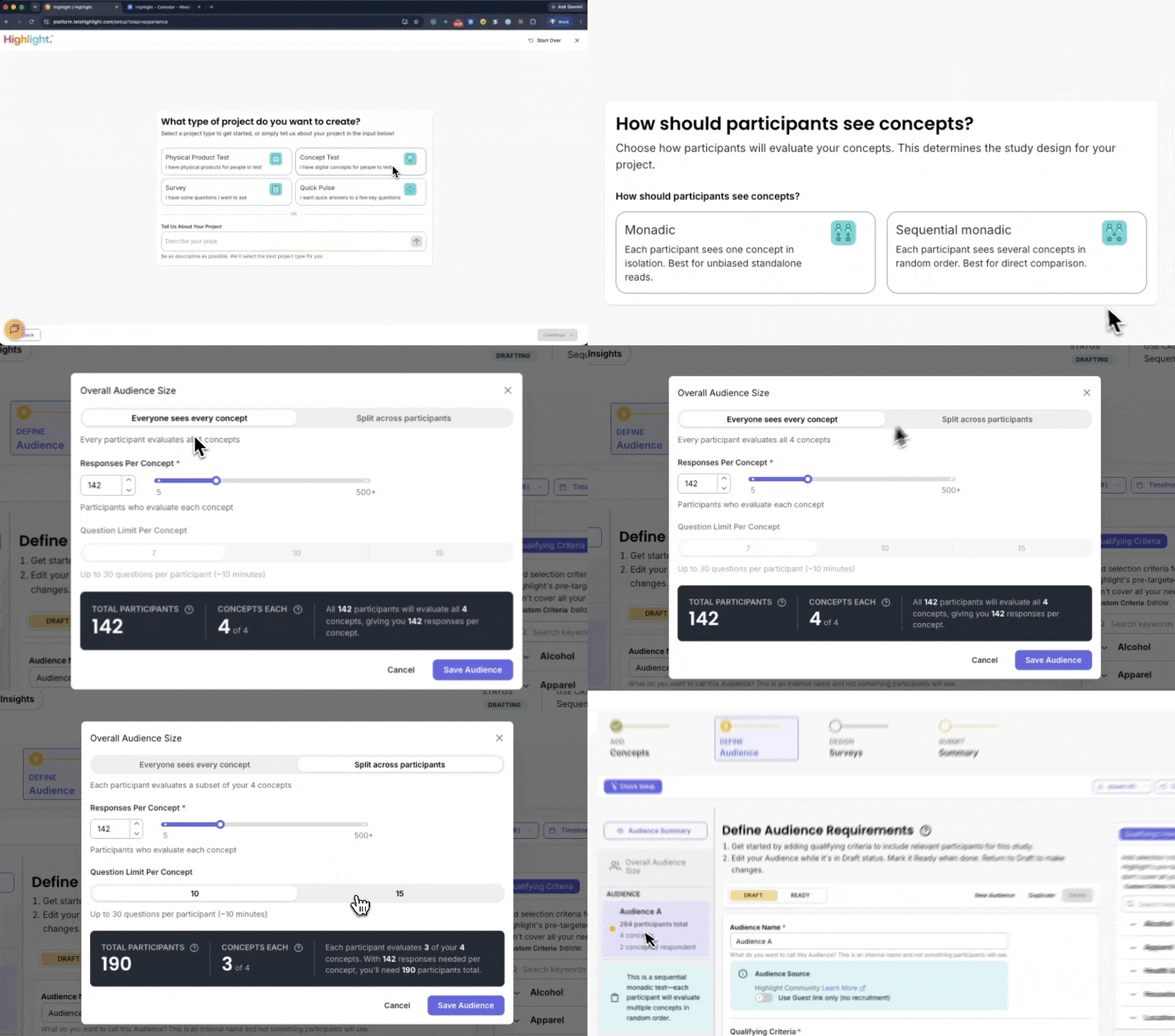
Choose from 160+ Survey Blueprints, providing research expertise for hundreds of use cases that span the full product lifecycle
With 17 (and counting) question types for both physical and digital testing needs (such as concept testing), you've got everything you need. Explore every available question type.
Search a 250+ expert-designed Question Library for easy drag-and-drop adding to your survey
.png?width=800&height=500&name=Crosstabs%20new%20brand%20(2).png)
Customize your analytics views to get the insights you need
The Highlight platform was built by research experts, and those same experts are always uncovering additional ways to meet our customers’ research needs.
That’s why our Insights Suite now includes:
- Median is available by default for scale questions in Crosstabs to account for outliers and skewed distributions
- Alienation Analysis segmentable by respondent demographics for easy access to deeper insights
- Penalty Analysis for longitudinal studies that reveals what drives dissatisfaction over time
.png?width=1000&height=1000&name=Dimensions%20for%20whats%20new%20in%20the%20platform%20page%20boxes%20(2).png)
Digital surveys are now live in the platform!
Highlight users can now run digital surveys – no physical products or concept stimuli required! Ask our nationwide community of panelists (who we endearingly call our Highlighters) the questions that matter most, and see those high-quality consumer insights roll in in real time.
Answer key questions like:
- What type of consumer is most interested in my product idea?
- Where can I find / engage with these consumers?
- What motivates these types of consumers when it comes to choosing products in my category?
- Where are the opportunities to win over these consumers? What are their unmet needs in this space?
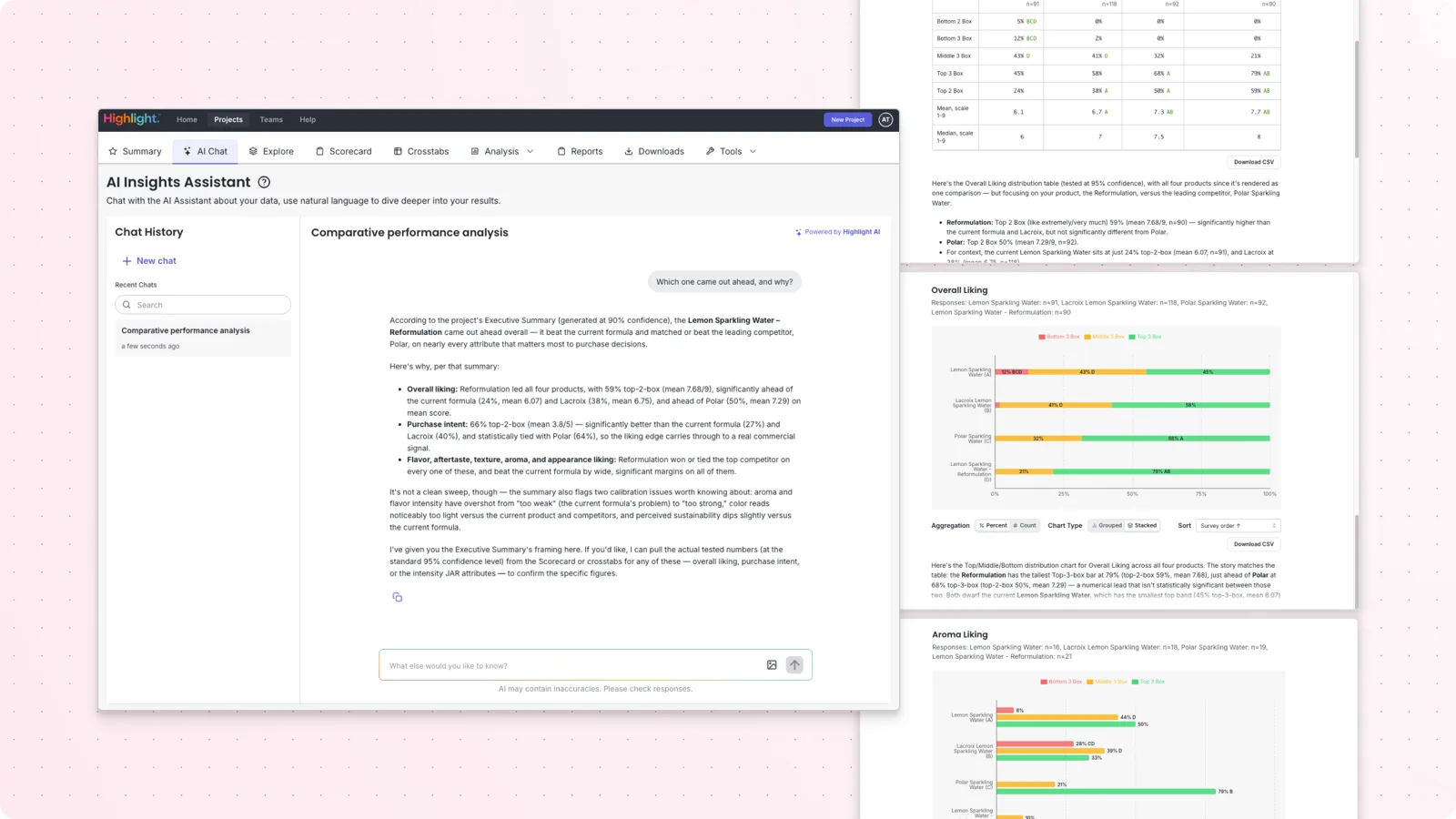
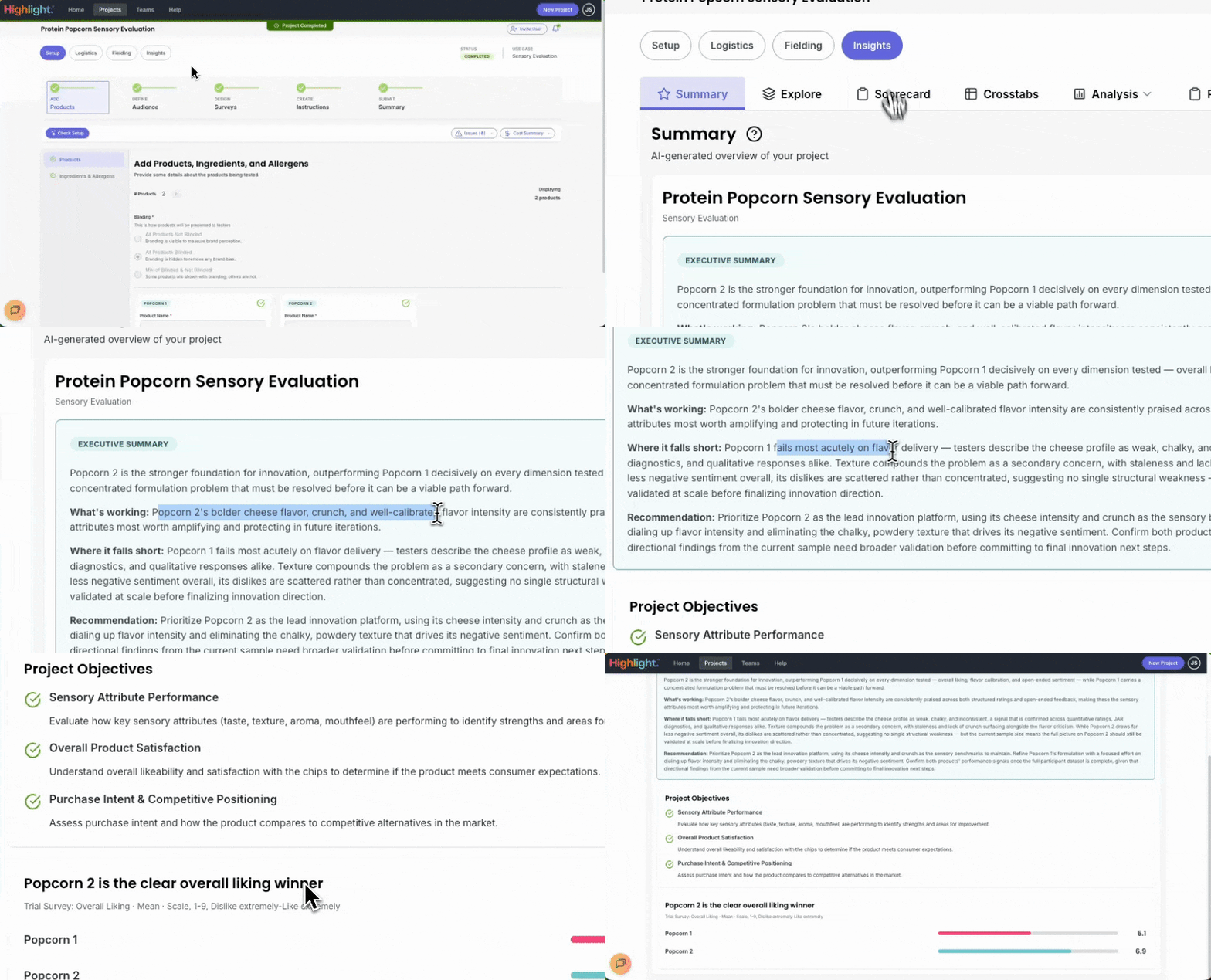
Customize what results populate your Insights Suite
Don’t have time to wait on your analysis? Your Insights Suite is now available from Day 1 of live data collection, so you can see how your Scorecard and Crosstabs are unfolding while responses are still coming in. Control which responses populate your Insights Suite in Settings by toggling between full completes only or include partial responses.
.gif?width=800&height=500&name=New%20brand%20website%20images%20(4).gif)

Highlight AI helps you build your ideal Scorecard
Now, you can use Highlight AI to generate a Scorecard surfacing your key metrics. Showcase the most impactful results from your research with updated customization options: Add additional metrics, drag and re-order metrics, and even include multiple metrics for the same question in order to create the Scorecard that perfectly fits your reporting needs.
.png?width=2000&height=1250&name=Personalized%20homepage%20(1).png)
Get started on your personalized homepage
The Highlight platform’s new homepage provides a personalized experience to your unique needs, whether that’s guiding you to project set up and Knowledge Base help for new users, or picking up right where you left off for returning users.
Resources, events, and more
The latest from Highlight
See the latest original research from the Highlight Community of product testers assessing consumer sentiment and household spending habits.
DOWNLOAD NOW
Prior to working with Highlight, the Hanes team faced issues related to cost, speed and flexibility. Now, nothing goes to market without a wear test first.
Read now
In this session from Highlight Spark, Spindrift VP and Williams Sonoma and Grove Collective alum Jon Silverman shares how to build a better-for-you brand people love.
WATCH NOW

![Images for Whats New in the Platform page [product marketing] Images for Whats New in the Platform page [product marketing]](https://www.letshighlight.com/hs-fs/hubfs/Images%20for%20Whats%20New%20in%20the%20Platform%20page%20%5Bproduct%20marketing%5D.gif?width=1000&height=700&name=Images%20for%20Whats%20New%20in%20the%20Platform%20page%20%5Bproduct%20marketing%5D.gif)

.png?width=1200&height=627&name=Product%20screens%20(5).png)